
Overview
The Proposal Generator allows you to create professional client proposals directly from a project in Followup CRM. Proposals remain connected to the project, making it easier to manage project details, client information, and proposal activity in one place.
Step-by-Step Instructions
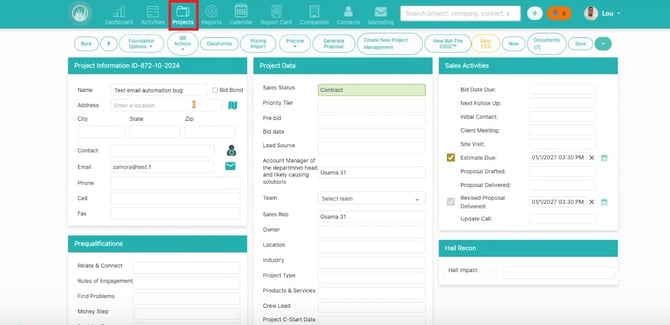
📁Step 1: Open the Project
- Navigate to Projects.
- Open the project you want to create a proposal for.
📝 Step 2: Click Generate Proposal
- Locate the Generate Proposal button on the project page.
- Click Generate Proposal to begin.
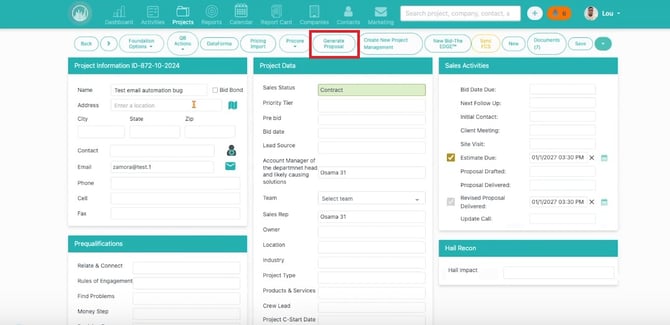
⚠️ Note: If you do not see the Generate Proposal button, Proposal Generator may not be enabled for your company or your user role may not have permission to create proposals.
👤 Step 3: Select a Contact
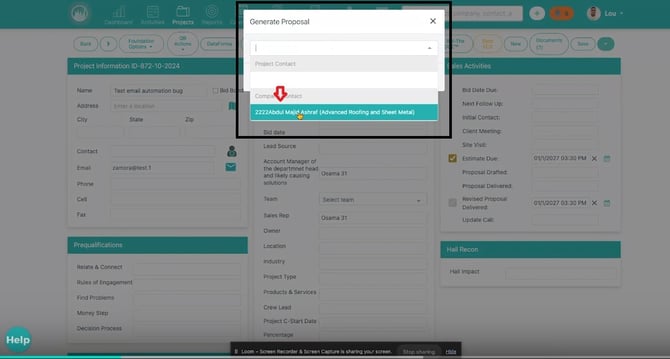
- Choose the contact associated with the proposal.
- Confirm the contact information is correct.
The selected contact may be used within the proposal and when sending it to the client.
📄 Step 4: Select a Proposal Template
- Choose the proposal template that best matches the type of proposal you want to create.
Templates may include:
- Cover Pages
- Introduction Sections
- Quote Pages
- Photo Pages
- Terms and Conditions
- Signature Sections
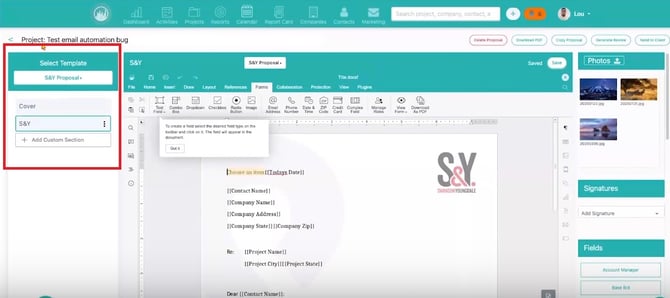
⚠️ Note: If the required template is unavailable, contact your CRM administrator.
🚀 Step 5: Open the Proposal Generator
- After selecting a contact and template, continue into the Proposal Generator.
From here, you can:
- Review proposal sections
- Edit content
- Add pricing
- Include photos
- Prepare the proposal for client delivery
You have successfully created a proposal and opened it in the Proposal Generator, where it can be customized before being sent to the client.
Best Practices💡 Verify project and contact information before creating a proposal.
💡 Choose the template that best matches the type of work being proposed.
💡 Use clear proposal names so proposals are easy to identify later.
💡 Confirm the correct contact is selected before continuing.
Happy Selling!